
Ever since the COVID-19 quarantine has started, our home internet with Izzi has had reliability problems.
Izzi woes
The speed with Izzi was good, when it was there. But we would get frequent, short drops throughout the day. 10 seconds here, 20 seconds there, a minute later on. In general, that wouldn’t be a huge deal. Even when watching Netflix, it wasn’t normally an issue, as the Netflix app buffers enough.
But, where it was especially problematic was video calls. We both do a lot of video calls (Zoom, WhereBy, Slack, etc.), and having a video call drop for 20 seconds seems. like. forever…
For example, here’s an example of our Izzi network outages for one day:
7/28/2020 1:09:49 AM 0:00:12
7/28/2020 7:57:07 AM 0:00:07
7/28/2020 7:57:43 AM 0:01:18
7/28/2020 8:19:48 AM 0:00:11
7/28/2020 9:11:33 AM 0:00:19
7/28/2020 9:21:44 AM 0:00:09
7/28/2020 9:22:00 AM 0:00:08
7/28/2020 9:39:18 AM 0:00:09
7/28/2020 10:01:37 AM 0:00:23
7/28/2020 10:46:01 AM 0:00:20
7/28/2020 10:46:28 AM 0:00:12
7/28/2020 11:01:33 AM 0:00:08
7/28/2020 11:06:15 AM 0:00:19
7/28/2020 11:11:17 AM 0:00:10
7/28/2020 11:11:34 AM 0:00:08
7/28/2020 11:48:19 AM 0:00:20
7/28/2020 11:49:33 AM 0:00:25
7/28/2020 11:50:40 AM 0:00:31
7/28/2020 12:00:57 PM 0:00:21
7/28/2020 12:01:43 PM 0:00:08
7/28/2020 12:02:39 PM 0:00:36
7/28/2020 12:03:59 PM 0:00:09
7/28/2020 12:04:50 PM 0:00:26
7/28/2020 12:06:24 PM 0:00:24
7/28/2020 12:07:13 PM 0:00:39
7/28/2020 12:09:55 PM 0:00:41
7/28/2020 12:10:49 PM 0:00:10
7/28/2020 1:02:06 PM 0:00:54
7/28/2020 1:03:53 PM 0:00:22
7/28/2020 1:43:28 PM 0:00:10
7/28/2020 1:57:18 PM 0:00:06
7/28/2020 1:59:55 PM 0:00:05
7/28/2020 2:00:24 PM 0:00:05
7/28/2020 2:01:08 PM 0:00:55
7/28/2020 2:02:26 PM 0:00:35
7/28/2020 2:07:30 PM 0:00:12
7/28/2020 2:11:45 PM 0:00:44
7/28/2020 2:12:52 PM 0:00:08
7/28/2020 2:16:19 PM 0:00:22
7/28/2020 2:17:04 PM 0:00:11
7/28/2020 2:26:59 PM 0:00:11
7/28/2020 2:47:35 PM 0:00:23
7/28/2020 3:18:40 PM 0:00:06
7/28/2020 3:19:15 PM 0:00:11
7/28/2020 3:19:48 PM 0:00:06
7/28/2020 3:20:18 PM 0:00:24
7/28/2020 3:21:39 PM 0:00:20
7/28/2020 3:23:07 PM 0:00:09
7/28/2020 3:23:39 PM 0:01:03
7/28/2020 3:27:25 PM 0:00:06
7/28/2020 3:30:56 PM 0:00:16
7/28/2020 3:32:02 PM 0:00:14
7/28/2020 3:32:39 PM 0:00:07
7/28/2020 3:33:16 PM 0:00:05
7/28/2020 3:33:49 PM 0:00:06
7/28/2020 3:34:40 PM 0:00:10
7/28/2020 3:35:13 PM 0:00:05
7/28/2020 3:36:43 PM 0:00:05
7/28/2020 3:37:58 PM 0:00:05
7/28/2020 3:38:26 PM 0:00:11
7/28/2020 3:39:18 PM 0:00:16
7/28/2020 3:40:41 PM 0:00:16
7/28/2020 3:41:44 PM 0:00:15
7/28/2020 3:42:46 PM 0:00:30
7/28/2020 3:43:59 PM 0:01:05
7/28/2020 3:45:49 PM 0:00:08
7/28/2020 3:46:45 PM 0:00:05
7/28/2020 3:47:59 PM 0:00:56
7/28/2020 3:49:19 PM 0:00:10
7/28/2020 3:49:52 PM 0:00:09
7/28/2020 3:53:47 PM 0:00:24
7/28/2020 4:01:03 PM 0:00:11
7/28/2020 4:01:21 PM 0:05:24
7/28/2020 5:21:02 PM 0:00:06
7/28/2020 5:37:08 PM 0:00:07
7/28/2020 5:43:52 PM 0:00:11
As you can see, there were lots of short drops throughout the day.
In case you’re curious, I use an app called Net Uptime Monitor to track my network – that’s where that data came from.
Here’s a speedtest for our Izzi service. Our contract was for 100/10.
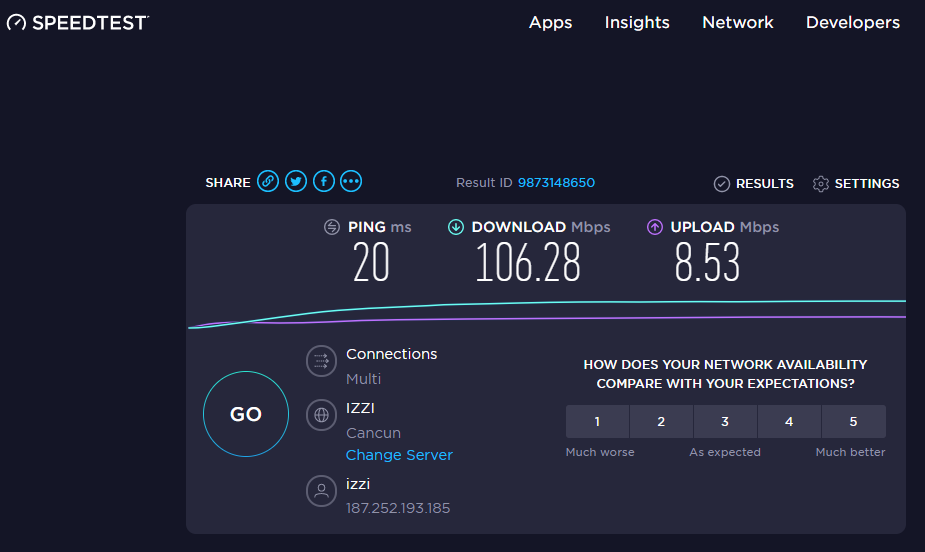
So when it was up, it was great. But all of those drops were killer.
Sharing is Not Caring
Cable internet (like Izzi) is shared from a central node where the ISP meets the local coaxial network. This means many homes have to share a single node. Sharing like this often leads to low speeds during peak use hours. And since so many more people are at home due to the pandemic, we were feeling the cable internet sharing pains.
Izzi connection problems
I was also starting to experience some Izzi connection problems to certain sites. In particular, I was seeing a lot of dropped and reset HTTPS connections to Amazon web services (such as *.s3.amazonaws.com). Many websites use Amazon’s Simple Storage Service (S3) for storing static content and images, including Github. I also had issues connecting to the AWS console (https://us-west-1.console.aws.amazon.com/).
I even tried switching my DNS settings, using Cloudflare (1.1.1.1) and Google (8.8.8.8). That didn’t help.
If I used my PIA VPN to connect to the United States, those connection problems went away. Still, it was annoying.
Telmex Fiber
This past week I finally said Enough!, and we contacted Telmex, and signed up for their fiber optic home service. Within a few days, their techs showed up, and did the install. They ran a new line from the pole at the street to our house, and ran it into the house exactly how I asked them to (to be fair, I did throw them a few extra pesos – money well spent – especially since they worked outside in the pouring-down rain).
We signed up for the 200 Mbps package for $899/month.
Now here’s our Telmex speed
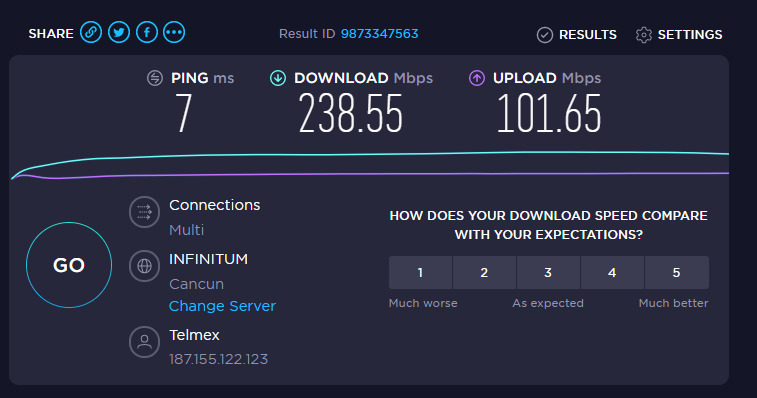
And over the last 5 days, here’s my network outage report:
8/6/2020 5:07:26 PM 0:00:06
One outage, for 6 seconds. That’s it!
Needless to say, I’m pretty excited with Telmex so far – both the speed and uptime.
Mesh Network
I’ve had a few people ask me what we use for internet at home – especially since Elizabeth and I work online.
Both the Telmex and Izzi routers are also wireless access points, so you can connect via WiFi. That works great, especially if you’re somewhat close to the router. But, since all of our houses here are concrete, the signal quickly fades. Our router is downstairs, but we work upstairs, and the WiFi signal isn’t great. So, we use a Google WiFi mesh system.
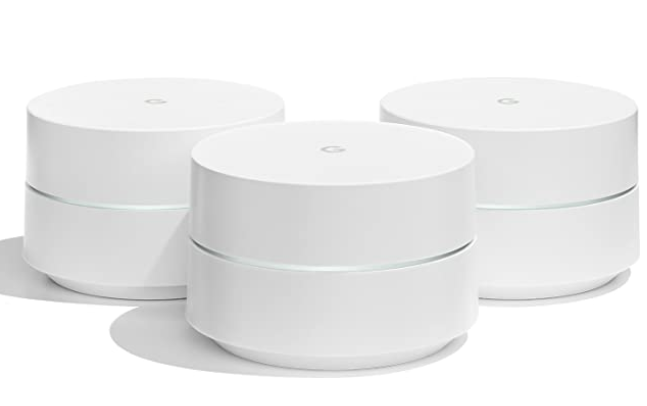
We’ve been using this now for 3 years, and it’s worked great.
We have 3 “pucks”. One plugs into the router, and then we have two upstairs. The 3 pucks create a wireless “mesh” network, allowing you to extend your WiFi system throughout the house. We can even connect when we’re on our 3rd floor terrace, and outside by the pool.
There’s now a newer version of the system called Google Nest Wifi. I don’t have personal experience with that, but it looks to be an improved version over the original system.
Additional Access Point
Our property actually has 2 houses on it – the main house where we live, and the smaller casita. As good as the Google mesh system is, it just didn’t make it into the casita. Between the amount of space between the two houses, and all of the concrete walls, the WiFi in the casita was weak.
So, to solve that problem we hired a friend to run a Cat 6 cable between the two houses. In the main house, it connects to the main router. And in the casita, we added another wireless access point.
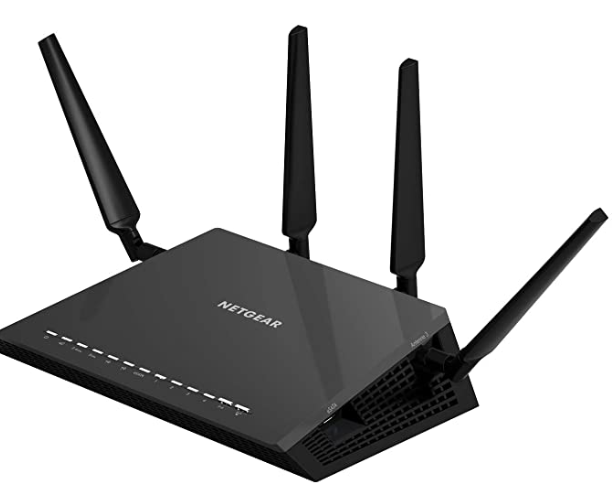
I actually had a pretty high-end Netgear router / access point that was in my box of tech goodies, so we plugged that into the casita, and boom! Super fast WiFi in the casita.
Internet is a utility, not a luxury
So between the new Telmex fiber optic, our Google Wifi mesh, and the additional Access Point in the casita – we’re in pretty good shape internet wise.
We still have our Izzi internet as well, for the moment. We’ll let the new Telmex service play out for a month or so, and if it continues to function well, we’ll completely drop Izzi.
And we’re still using our UPS (Uninterruptible Power Supply), so on those occasions where CFE fails us, at least we still have internet for a few more hours.
Great recap. We have a condo in Cabo and switched over to fiber for the same exact reasons. After 9am, the internet was unusable. Now with finer, we have MS Teams/Zoom meeting with no issues.
Is it $899/month in pesos or dollars??
Thanks
Pesos.
$899 pesos is about $40 USD today.
$899 in USD would be insane!
Were your speed tests done here over WiFi?
Also, is love to get another update about IZZI performance before your service is gone. Thanks!
Yes, our speed tests are over WiFi. I run an internet cable from the modem to my TV, as its close, but other than that, everything connects via WiFi.
Izzi speed tests still look good; Since my laptop now connects to Telmex instead of Izzi, my network monitor no longer monitors the Izzi uptime.
Gary,
What is the make and model of your Telmex fiber modem? I am in Loreto and fiber is expected to come to our homes soon. Trying to plan ahead.
Thanks,
Doug
Mine is a Sercom Model FG6123BTM
Hey Gary! is your telemax internet good enough that you cancelled your izzi? curious to know. thanks.
Hello!
Actually, we’ve kept Izzi as well (as a backup), although we’ve been saying for a while now that we should just cancel it. It’s been one of those ToDo list items that I just haven’t gotten around to. haha.
Telmex has been great for us.
Hi, do you know if its possible to use your own modem with telmex fiber? i run a custom setup for work and i would need to use my own equipment like here in the states, do you know if its possible? thanks!
Sorry, I don’t know. I use the Telmex modem, and then plug in my own Ubiquiti equipment (controller, switch, access points, etc.)
When connecting your mesh system did you have to change any settings on the
Telmex modem?
No, not at all. Just plugged it into the Telmex modem
Hola. I’m near Ajijic, in Jalisco, and primarily use Starlink. I’ve kept my original TotalPlay fiber service as a backup, and even have a double-WAN load balancer that I plan to set up, to bond the two services. I also use Google and Nest network gear.
Unfortunately, the TotalPlay service is opinionated and can’t be placed into bridge mode, nor can they provide a simple ONT device instead, so I’m doomed to double-NAT issues and more if I connect the TotalPlay to my network. Cancelling soon, since it’s collecting dust.
TelMex fiber is rolling out here. Do you know if their service can just be bridged over and get out of my way?
Muchas gracias.
LQ
Hey Lou – I *think* you can, but I haven’t tested it. Once I log into the Telmex modem, I see “enable bridge” and a “Bridge Mode” (including transparent bridging) as options within the PON WAN settings.
Gary, this information is priceless. We are in San Miguel de Allende and have Totalplay Fiber to our property. But when attempting to set this up for our CCTV cameras and remote access, my IPFire router box that will support DynDNS so I can find the network remotely won’t work behind Totalplay double NAT standard config, and as others have mentioned, there is no way to get around this – they just don’t let you put the ONT into bridge mode.
We are considering replacing it with Telmex Fiber (residential) here, but in attempting to get anyone from Telmex to confirm that we can put their ONT into bridge mode, I’m getting the run around.
If anyone has been able to do this, I’m all ears. Would love to hear your experience.
I have not yet tried to put my Telmex router into bridge mode. It looks like it’s possible, but I haven’t done it.
I haven’t had a problem with it working as is, so I haven’t changed it.
I have a Ubiquiti UDM Pro controller, and 2 Ubiquiti switches. All my cameras are Ubiquiti (running their protect app), and I also run Home Assistant, and my cameras tie into that via RTSP.
So far, everything works perfect, even when I’m remote, so I haven’t had a need to reconfigure anything.
From what I’ve seen, Telmex should be able to be bridged.
Hope this helps, and good luck!
Hi there! Thanks for this! Can you share if 500Mpbs is the highest Telmex Fiber Optics goes up to? I’ve been trying to located the answer elsewhere but can’t seem to find. I found some plan options online but I see it stop at 400mpbs so unsure if that’s just because it’s not as common. Putting a proposal together to move down there and internet speed was a concern. Much appreciated!
Looking on https://telmex.com/web/hogar/paquetes-de-internet , I see that 1000 Megas is their fastest speed.
It may depend on the specific location though, so you may want to check with Telmex for what’s available at a specific house/condo/address.