
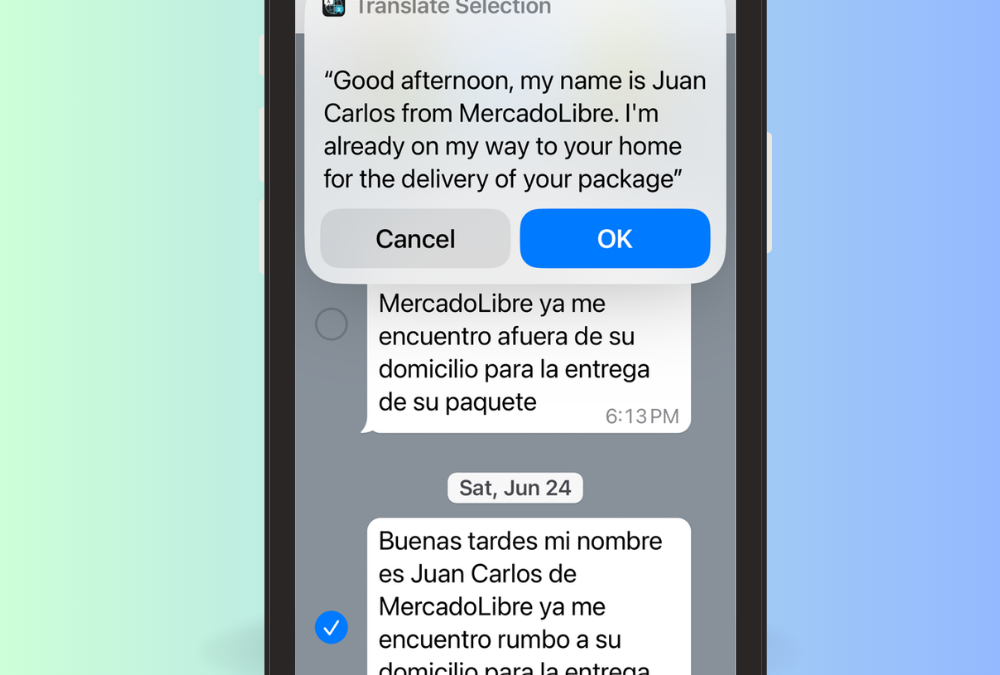
WhatsApp is by far the most common form of messaging here in Mexico. And, of course, the messages are often in Spanish. I’ve always wanted the ability to easily translate text messages from Spanish into English within WhatsApp. Although my Spanish is better than it used to be, there’s still plenty of times where I need some translation help.
Of course, you can copy the message, then paste into a translation app (such as Google Translate or DeepL), but it would be nice to be able to do it directly within the app. I’ve heard that this is built into WhatsApp on Android devices. Sadly, it’s not for iOS (iPhones).
And on occasion, I’ll receive a voice message in Spanish over WhatsApp. I’ve wanted the ability to transcribe (and translate) those messages as well.
I recently figured out how to do this. This post will demonstrate how. Giddy up.
Translating WhatsApp Text Messages on iOS
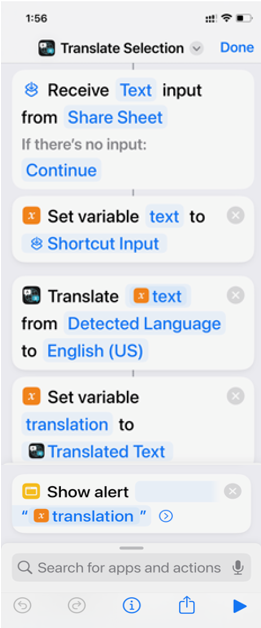
You can do this using the Shortcuts app, and the built-in translation feature.
- Within iOS, open the Shortcuts app. From the Gallery, look for the “Translate Selection” shortcut. Add it to your list of Shortcuts.
- From within Whatsapp, hold down on a message, and choose Forward, then the Share icon, and click on Translate Selection.
- The Translation will show in a popover, without leaving WhatsApp.
- If Translate Selection isn’t there, scroll all the way down, and click on Edit Actions…
- This should allow you to add Translate Selection to the list of Actions.
Here’s a video showing it in action:
Transcribe and Translate WhatsApp Voice Messages on iOS
It’s not uncommon to receive a voice message in Spanish, with someone speaking way too fast for me to understand. So, lets see how to transcribe and translate that voice message.
Giacomo Melzi has created a iOS shortcut to do this, so I used his solution. His setup guide is well done, so follow along here: Instantly transcribe voice messages to text on your iPhone
Basically, it’s an iOS shortcut, that then uses ChatGPT to transcribe the audio into text. The text output will be in the same language as the voice message. In my normal workflows, that would be Spanish.
Then, I added another step to his shortcut, that simply Runs the Translate Selection shortcut (like we did above), so that will translate the text from Spanish into English.
Boom! We’ve just taken a Spanish voice message and turned it into English text.
Here’s a video showing it in action:
ChatGPT API
As the transcription uses the ChatGPT API, you do need to setup an API account. You can create a free trial to try it, and then add a credit card if you want to keep using it. Don’t worry, it’s super cheap (around 0.006$ per minute of transcription). Also, you can set up a hard monthly limit. I added $10 to my account over a month ago, and I still have a balance of $9.90. Obviously, it depends on your usage.
Shortcuts and ChatGPT FTW!
Hopefully at some point, this will all be natively built into WhatsApp. Until then, I’ll be using these handy shortcuts. Hope you find them useful as well.
Hi, Gary. None of these instructions work for me. When I go to Shortcuts settings, I see choices for suggested languages. I have English and Spanish chosen. Then there is just a long list of other languages.
If I go to Shortcuts/Advanced, it says “allow running scripts, and “allow sharing or deleting large amounts of data”.
I guess I’ll stick with the copy and paste method. Thanks.
Use the Shortcuts App, not Settings
Thank you for this!!!!!
Hi Gary,
I followed the instructions but from Whatsapp when I click on share the Translate shortcut does not show up
If Translate Selection isn’t there, scroll all the way down, and click on Edit Actions…
This should allow you to add Translate Selection to the list of Actions.
Hi. It is not in my edit actions menu. How do I get it there?
If Translate Selection isn’t there, scroll all the way down, and click on Edit Actions…
This should allow you to add Translate Selection to the list of Actions.
Thank you for this tip. However, it doesn’t show up in the actions. When I go to the bottom to edit actions it does not appear and there doesn’t seem to be an option to add it
Hmmm – weird – are you sure your shortcut has: Receive Text (or Media) Input from Share Sheet?
Same. Not there…
Hmmm – weird – are you sure your shortcut has: Receive Text (or Media) Input from Share Sheet?
Just found this thread ! It worked thank you so much !
Hi Gary, just a quick comment to say thank you so much for this solution. I have been looking a long time for something this easy to translate Spanish WhatsApp messages to English without copying and pasting into another app. Great tip.
super – glad it helped!
Thank you very much for your tip. I made some choices and got the shortcuts to show up on the action list by making sure it can receive from share list. It still doesn’t work but I will fool around with it later. There are many variables
This was great advice. Thank you 🙏🏾